| Home » Categories » Multiple Categories |
How can I change my FTP password on my Control Panel? |
|
Article Number: 97 | Rating: 1/5 from 1 votes | Last Updated: Wed, May 2, 2012 at 12:43 AM
|
| You can certainly change your FTP password via our Control Panel. Please follow the guidelines below: 1. Please login to your Control Panel 2. Please click on the "Domain" and please click your domain 3. Please click on the "Web Hosting Settings" that is inside the domain menu 4. On the "Preferences" section, you will see "New FTP/Microsoft Front Page password" option. You can certainly enter your new FTP password here. Please take note that changing your FTP password will NOT alter the password of your Control Panel and Help Desk System. 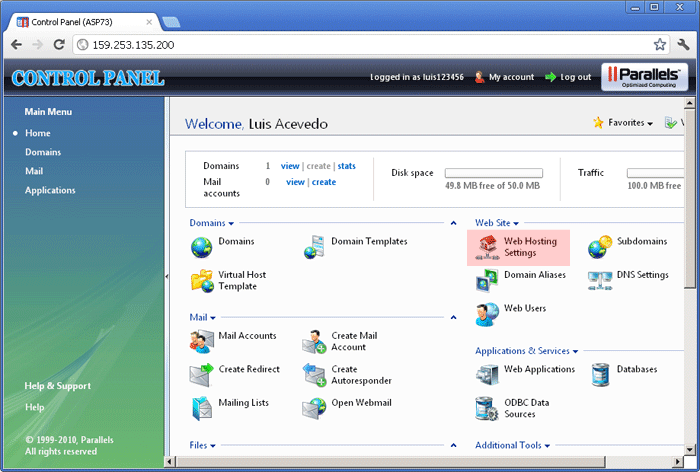 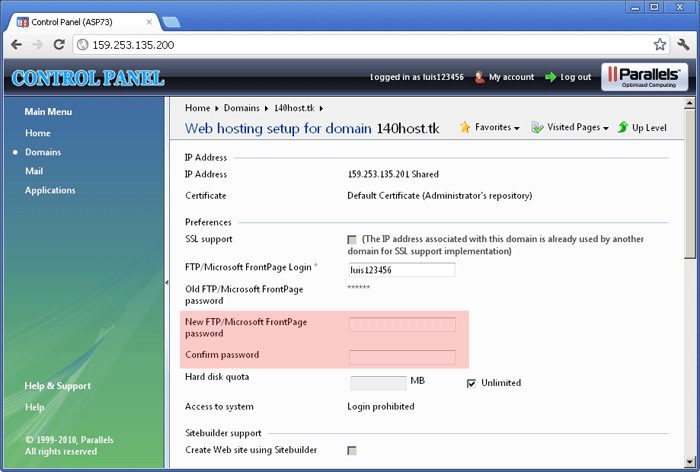 |
Attachments

There are no attachments for this article.
|
Related Articles 
Can I setup a Scheduled Task on my Control Panel?
Viewed 4001 times since Wed, May 2, 2012
I receive this error message: "Failed to retrieve directory listing". What should I do?
Viewed 11484 times since Mon, Apr 30, 2012
How can I enable ASP.NET MVC framework on your Control Panel?
Viewed 4402 times since Wed, May 2, 2012
I can access my Control Panel, but I cannot login...
Viewed 4224 times since Wed, May 2, 2012
How can I enable ASP.NET 3.5 on your Control Panel?
Viewed 4391 times since Wed, May 2, 2012
Why can’t I see or select ASP.NET 4.6.1 on my Control Panel?
Viewed 7280 times since Wed, Feb 17, 2016
I receive this error message: "Connection Times Out" when trying to FTP my files to your server. What should I do?
Viewed 3191 times since Mon, Apr 30, 2012
Why can’t I see or select ASP.NET 4.6 on my Control Panel?
Viewed 3926 times since Wed, Feb 17, 2016
I cannot find a way to enable ASP.NET MVC 4 on my Control Panel
Viewed 4882 times since Tue, Sep 11, 2012
I cannot login to my Control Panel. What should I do?
Viewed 4069 times since Wed, May 2, 2012
|
 Subscribe to Article
 Print Article
-
 Email Article to Friend
 Export to PDF
 Export to MS Word
 Tweet This Article
 Digg It
 Stumble Upon
 Del.icio.us