| Home » Categories » Multiple Categories |
What is my MS SQL Connection String on my SQL Management Studio tool? |
|
Article Number: 54 | Rating: 4.3/5 from 14 votes | Last Updated: Wed, Sep 24, 2025 at 12:15 AM
|
The connection string of your MS SQL database will always depend on the MS SQL version that you create via our Control Panel. You can find the connection string details by logging into our Control Panel -> Database.
When you connect from your local PC to your database located on our server, there is a remote connection made between your PC and your database on our server. Hence, you need to use our server's IP address to connect. You can find our server's IP Address on the activation email that we sent you during the activation of your account. The following is just an example of the SQL Server connection: 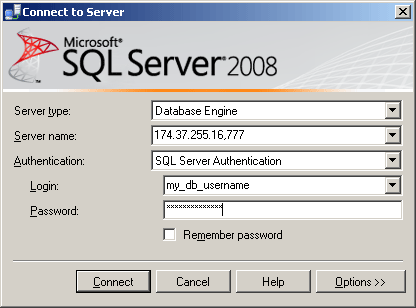 For the new Control Panel, please do NOT use the private IP to connect on your SSMS tool. Please check the following screenshot: 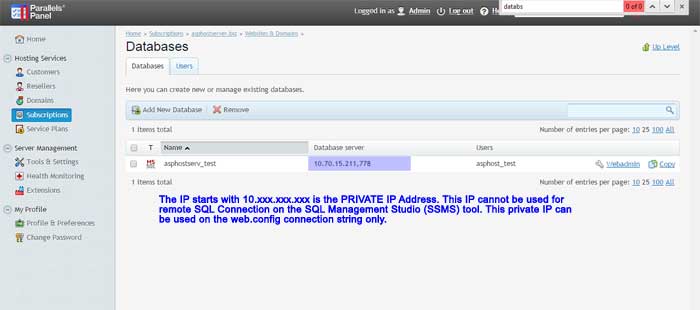 For the above case, the IP used on your SSMS tool is NOT 10.70.15.211,778. However, the correct IP Address is always your Control Panel IP Address, together with the correct SQL Server Port Number (e.g. 159.253.151.168,778) NOTE: If you use the latest SQL Server Management Studio (SSMS) Tool, please make sure you tick the option: "Trust Server Certificate" when making the remote SQL Connection to our DB Server  The following is our SQL Server Port Number: SQL 2008: Port 777 SQL 2008 R2: Port 778 SQL 2012: Port 779 SQL 2014: Port 780 SQL 2016: Port 781 SQL 2019:Port 783
SQL 2022:Port 784
|
Attachments

There are no attachments for this article.
|
Related Articles 
How to Restore MSSQL Database by using "Import Dump"?
Viewed 1638 times since Sun, Mar 9, 2025
Do you support Remote MSSQL connection?
Viewed 4431 times since Mon, Apr 30, 2012
Do you support Remote mySQL connection?
Viewed 4043 times since Mon, Apr 30, 2012
How can I access my nightly database backup?
Viewed 3278 times since Tue, May 1, 2012
How do I login to my SQL database remotely?
Viewed 7679 times since Mon, Apr 30, 2012
Do you support MS SQL WebAdmin access?
Viewed 6145 times since Tue, May 1, 2012
Do you support SQL 2012?
Viewed 3852 times since Fri, May 4, 2012
I cannot login to my MS SQL database remotely. What did I do wrong?
Viewed 7189 times since Mon, May 7, 2012
I receive this error message: "Unknown file type (binary data)" when trying to deploy my SQL CE database. What did I do wrong?
Viewed 4839 times since Thu, May 3, 2012
What is my MS SQL Connection String on the web.config?
Viewed 46533 times since Tue, May 1, 2012
|
 Subscribe to Article
 Print Article
-
 Email Article to Friend
 Export to PDF
 Export to MS Word
 Tweet This Article
 Digg It
 Stumble Upon
 Del.icio.us