| Home » Categories » Multiple Categories | ||||||||||
How To Create Nagios Plugins With Python On Ubuntu 12.10 |
||||||||||
|
Article Number: 262 | Rating: Unrated | Last Updated: Tue, Sep 23, 2025 at 11:06 PM
|
||||||||||
This time, we will expand on this idea and create Nagios plugins using Python.Step 1 - Install NRPEapt-get install -y python nagios-nrpe-server useradd nrpe && update-rc.d nagios-nrpe-server defaults Step 2 - Create your Python ScriptIt would be a good idea to keep your plugins in same directory as other Nagios plugins (/usr/lib/nagios/plugins/for example). For our example, we will create a script that checks current disk usage by calling "df" from shell, and throw an alert if it is over 85% used: #!/usr/bin/python
import os, sys
used_space=os.popen("df -h / | grep -v Filesystem | awk '{print $5}'").readline().strip()
if used_space < "85%":
print "OK - %s of disk space used." % used_space
sys.exit(0)
elif used_space == "85%":
print "WARNING - %s of disk space used." % used_space
sys.exit(1)
elif used_space > "85%":
print "CRITICAL - %s of disk space used." % used_space
sys.exit(2)
else:
print "UKNOWN - %s of disk space used." % used_space
sys.exit(3)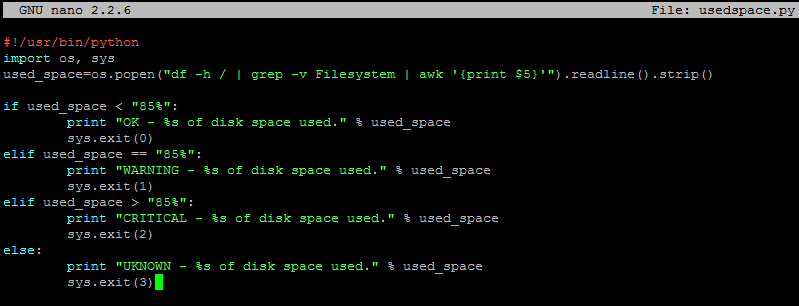 We will save this script in /usr/lib/nagios/plugins/usedspace.py and make it executable:
chmod +x /usr/lib/nagios/plugins/usedspace.py The entire Nagios NRPE plugin boils down to using exit codes to trigger alerts. You introduce your level of logic to the script, and if you want to trigger an alert (whether it is OK, WARNING, CRITICAL, or UNKNOWN) - you specify an exit code. Refer to the following Nagios Exit Codes: Nagios Exit Codes
Step 3 - Add Your Script to NRPE configuration on client hostDelete original /etc/nagios/nrpe.cfg and add the following lines to it: log_facility=daemon pid_file=/var/run/nagios/nrpe.pid server_port=5666 nrpe_user=nrpe nrpe_group=nrpe allowed_hosts=198.211.117.251 dont_blame_nrpe=1 debug=0 command_timeout=60 connection_timeout=300 include_dir=/etc/nagios/nrpe.d/ command[usedspace_python]=/usr/lib/nagios/plugins/usedspace.py Where 198.211.117.251 is our monitoring server from previous articles. Change these to your own values. Make sure to restart Nagios NRPE service: service nagios-nrpe-server restart Step 4 - Add Your New Command to Nagios Checks on Nagios Monitoring ServerDefine new command in/etc/nagios/objects/commands.cfg define command{
command_name usedspace_python
command_line $USER1$/check_nrpe -H $HOSTADDRESS$ -c usedspace_python
}As you can see, it uses NRPE to make TCP connections to port 5666 and run command 'usedspace_python', which we defined in /etc/nagios/nrpe.cfg on that remote host. Add this check to your Nagios configuration file. For our example, we will monitor a server called Ubuntu and edit /etc/nagios/servers/Ubuntu.cfg define service {
use generic-service
host_name Ubuntu
service_description Custom Disk Checker In Python
check_command usedspace_python
}Restart Nagios: service nagios restart Verify that the new check is working. And you are all done! |
||||||||||
Attachments

There are no attachments for this article.
| ||||||||||
Related Articles 
How To Set Up Apache Virtual Hosts on Ubuntu 12.04 LTS
Viewed 4094 times since Mon, Dec 23, 2013
How To Use SFTP to Securely Transfer Files with a Remote Server
Viewed 6540 times since Thu, Dec 26, 2013
How To Set Up vsftpd on CentOS 6
Viewed 2788 times since Thu, Dec 26, 2013
How To Install nginx on Ubuntu 12.04 LTS
Viewed 3338 times since Tue, Dec 24, 2013
How To Set Up SSH Keys
Viewed 3968 times since Thu, Dec 26, 2013
Initial Server Setup with Ubuntu 12.04
Viewed 3021 times since Mon, Dec 23, 2013
How To Set Up Python 2.7.6 and 3.3.3 on CentOS 6.4
Viewed 8017 times since Sat, Jan 4, 2014
The Basics of Using the Sed Stream Editor to Manipulate Text in Linux
Viewed 7092 times since Fri, Dec 27, 2013
How To Launch Your Site on a New Ubuntu 12.04 Server with LAMP, SFTP, and DNS
Viewed 3261 times since Thu, Dec 26, 2013
How To Setup ownCloud 5 On Ubuntu 12.10
Viewed 6290 times since Sat, Jan 4, 2014
|
 Subscribe to Article
 Print Article
-
 Email Article to Friend
 Export to PDF
 Export to MS Word
 Tweet This Article
 Digg It
 Stumble Upon
 Del.icio.us